How to Add Alt Text to Images with Chrome Extension
Alt Text Generator Chrome Extension - Complete Tutorial
2 min
Setup time
2
Free credits
32+
Languages
All
Image formats
Alt Text Generator AI Chrome Extension automatically generates descriptive alt text for images using AI to help you rank faster and improve accessibility right from your browser.
Install the Extension
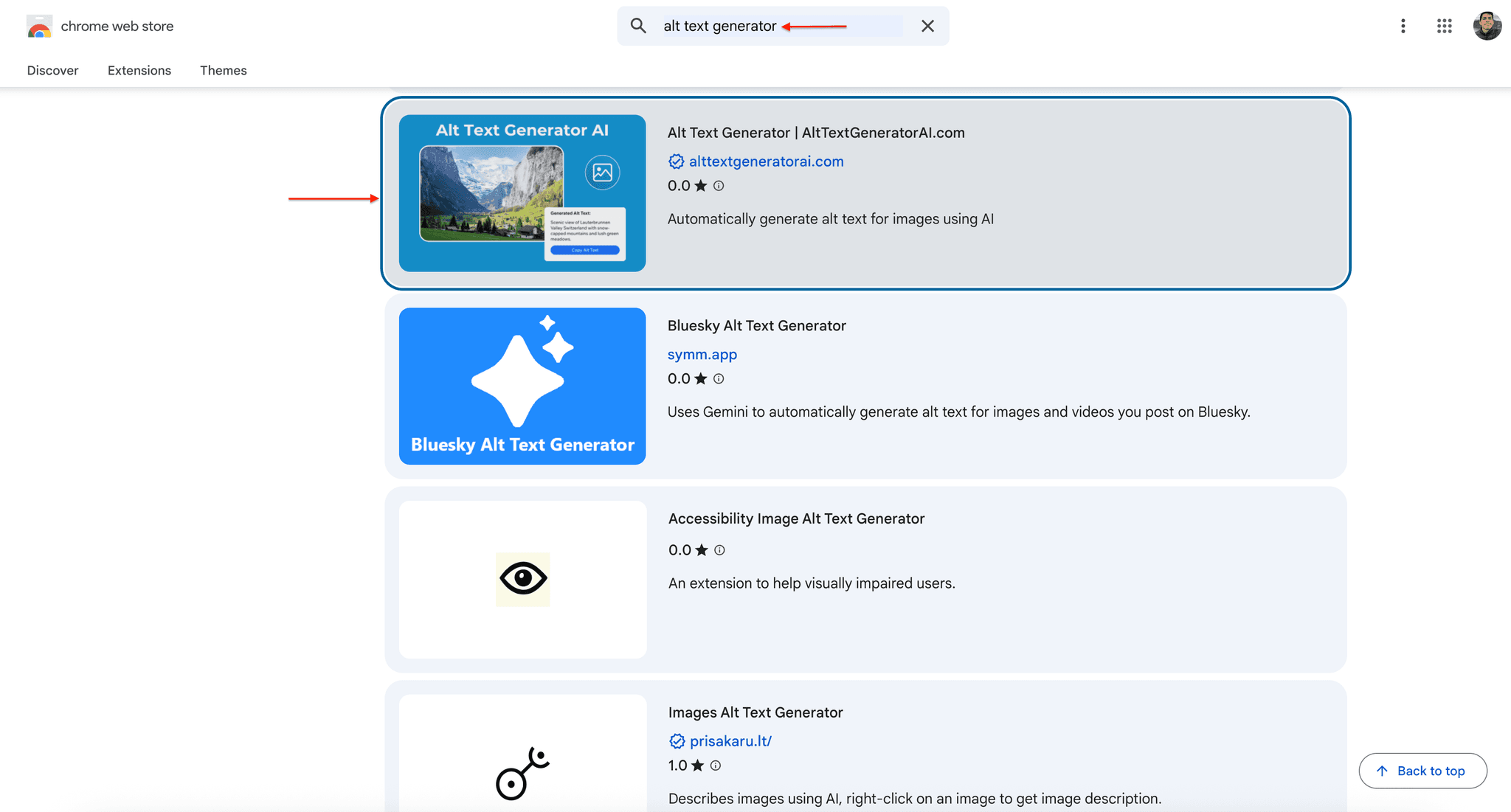
- Go to the Chrome Web Store
- Search for "Alt Text Generator"
- Click on Alt Text Generator | AltTextGeneratorAI.com
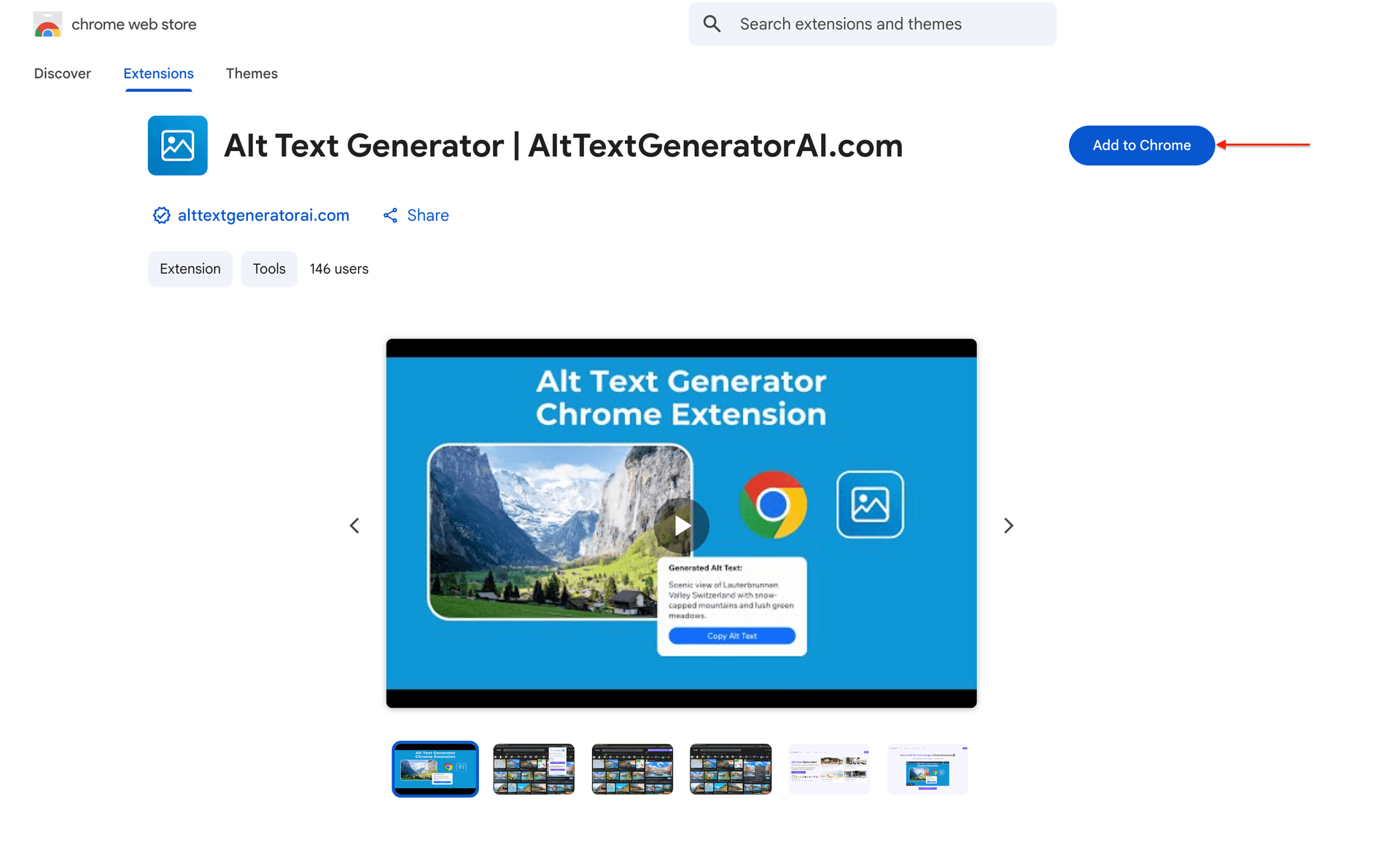
- Click "Add to Chrome"
- Confirm by clicking "Add extension"
Get Your API Key
- Create an account on AltTextGeneratorAI.com
- Go to your dashboard
- Copy your unique API key
⚠️Your API key is unique to your account. Keep it secure.
Configure the Extension
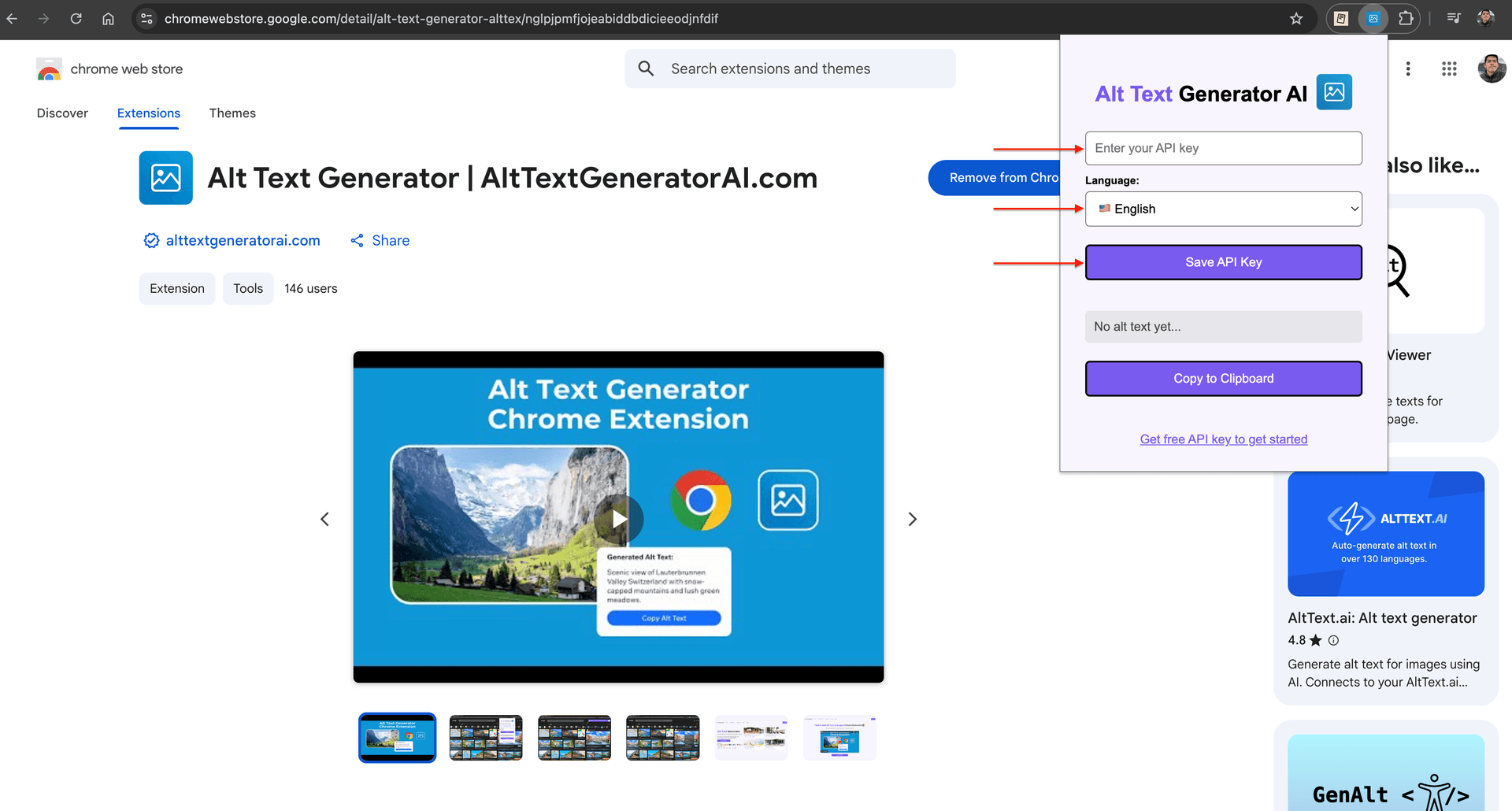
- Click the extensions icon in the top-right corner of Chrome
- Click on Alt Text Generator
- Paste your API key in the designated field
- Select your preferred language for alt text
- Click Save API Key
✅Done! Your extension is now ready to use.
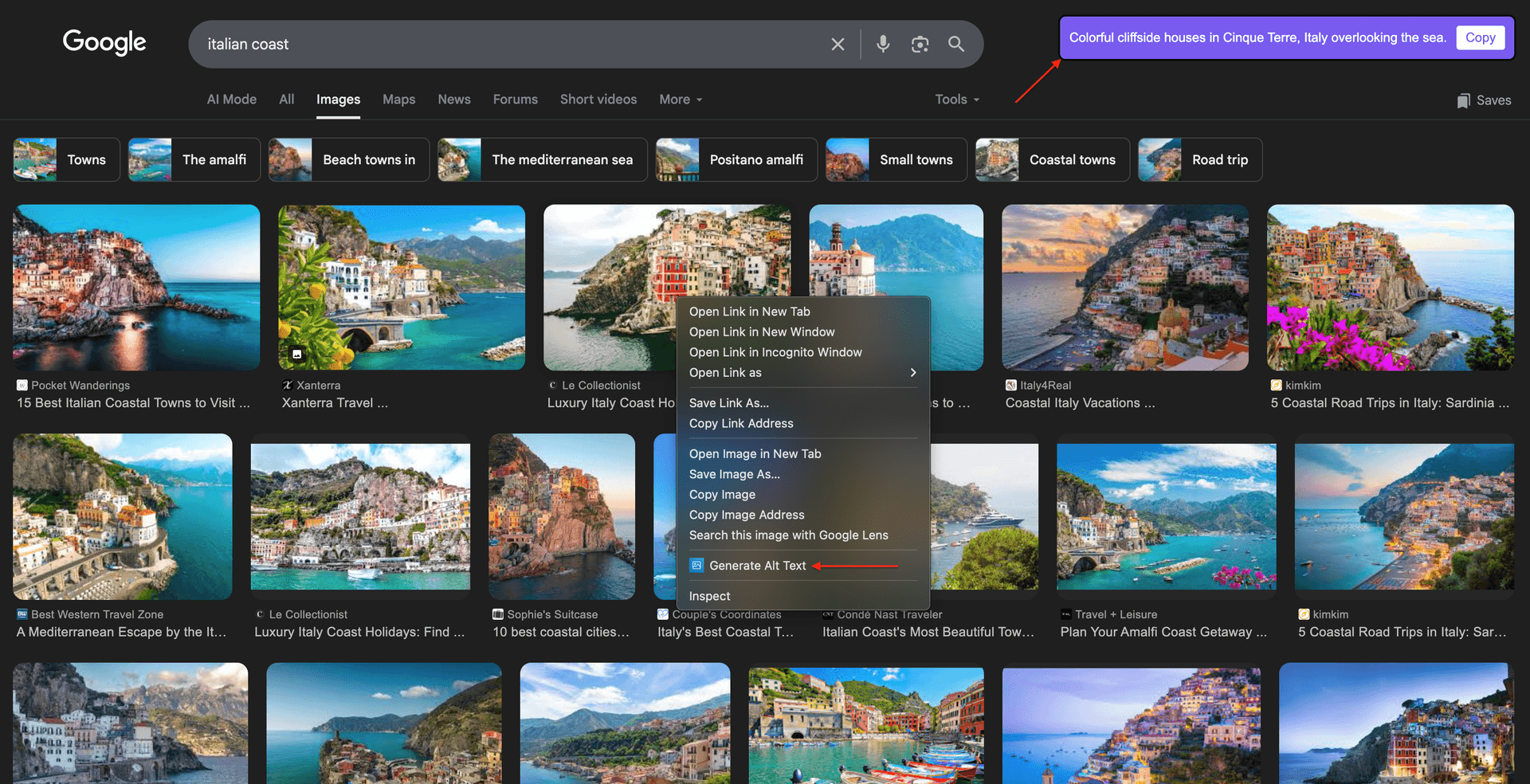
Generate Alt Text
- Navigate to any image on the web
- Right-click on the image
- Click on "Generate Alt Text"
- Done! Alt text appears automatically on your screen
💡You can also view generated alt text by clicking the extension icon.
Extension Features
Alt Text Generator Chrome Extension automatically generates descriptive alt text for images using AI to help you rank faster and improve accessibility right from your browser.
Right-Click to Generate
Simply right-click on any image and select "Generate Alt Text". Alt text appears instantly on your screen.
Instant Results
Get AI-generated alt text in seconds. No waiting, no complex setup—just point, click, and copy.
Easy to Set Up
Install from Chrome Web Store, paste your API key, and you're ready. Setup takes about 2 minutes.
Free Credits
Get 2 free credits upon sign up to test the extension before committing to a plan.
All Image Types
Supports all image types on the web. Works with any image you can right-click on.
32+ Languages
Generate alt text in English, Spanish, French, German, Chinese, Japanese, Arabic, and 25+ more languages.
Works Anywhere
Use it on any website—social media, e-commerce, news sites, anywhere you browse with Chrome.
Easy Copy
Copy the generated alt text with one click. Paste it anywhere you need—CMS, code, or documents.
Accessibility Focused
Generated alt text is descriptive and accessible, helping improve web accessibility for screen reader users.
Why Use a Chrome Extension?
❌ Without the Extension
- •Download image, upload to a separate tool, copy the result
- •Switch between multiple browser tabs
- •Lose context while writing alt text
- •Time-consuming workflow for each image
✅ With Alt Text Generator Extension
- •Right-click any image, get alt text instantly
- •Stay on the same page—no context switching
- •Generate alt text while you browse
- •Copy and paste in seconds
Chrome Extension FAQs
What is the Alt Text Generator Chrome Extension?
It's a browser extension that lets you generate AI-powered alt text for any image on the web with a simple right-click. Perfect for content creators, developers, and anyone who needs descriptive image alt text.
How do I install the extension?
Go to the Chrome Web Store, search for "Alt Text Generator", click "Add to Chrome", then configure your API key from AltTextGeneratorAI.com.
Do I need an account to use it?
Yes, you need a free account at AltTextGeneratorAI.com to get your API key. Sign up takes less than a minute and you get 2 free credits to try it out.
How do I generate alt text for an image?
Simply right-click on any image while browsing, click "Generate Alt Text" from the context menu, and the AI-generated description will appear on your screen ready to copy.
What image formats are supported?
The extension supports all standard web image formats including JPEG, PNG, GIF, WebP, SVG, and more. If you can see it in your browser, you can generate alt text for it.
What languages are supported?
We support 32+ languages including English, Arabic, Bulgarian, Chinese, Croatian, Czech, Danish, Dutch, Finnish, French, German, Greek, Hebrew, Hindi, Hungarian, Indonesian, Italian, Japanese, Korean, Malay, Norwegian, Polish, Portuguese, Romanian, Russian, Serbian, Spanish, Swedish, Thai, Turkish, Ukrainian, and Vietnamese.
Do I get free credits?
Yes! You get 2 free credits when you sign up at AltTextGeneratorAI.com. This lets you test the extension before choosing a plan.
Does it work on all websites?
Yes, the extension works on virtually any website you visit with Chrome. Social media, e-commerce, news sites, blogs—anywhere images are displayed.
Where can I see the generated alt text?
The alt text appears in a notification in the top-right corner of your screen. You can also click the extension icon to view the most recently generated alt text.
Is my data secure?
Yes. We only process the image you right-click on. Your browsing data and other images are never accessed. Read our Terms of Service for more details.
Other Integrations

Ready to Get Started?
Install the Chrome extension and start generating alt text instantly. Get 2 free credits on sign up!