How to Add Alt Text to Images in Shopify
Alt Text Generator Shopify App - Complete Tutorial
Automatic
Alt text on new products
Bulk
Alt text generation
131+
Languages
Flow
Shopify Flow action
WCAG
& ADA compliant
Alt Text Generator AI is a Shopify app that writes descriptive, SEO-friendly alt text for your product, collection, blog and file images using AI. Generate alt text automatically when you add a product, fix every missing or short alt text in bulk, or run it from the Products page and Shopify Flow. Follow this step-by-step tutorial to add alt text to your Shopify images.
What you get:
- Automatic alt text for new products, collections, blog images and files
- Bulk alt text generation for collection images, blog post images and files
- A Generate alt text action on the Shopify Products page
- A Shopify Flow action to automate alt text
- Edit any generated alt text in the app
- 131+ languages
- Support for JPEG, JPG, PNG, GIF, SVG, AVIF and WEBP images
- WCAG & ADA compliant alt text
- One-time credit packs that never expire
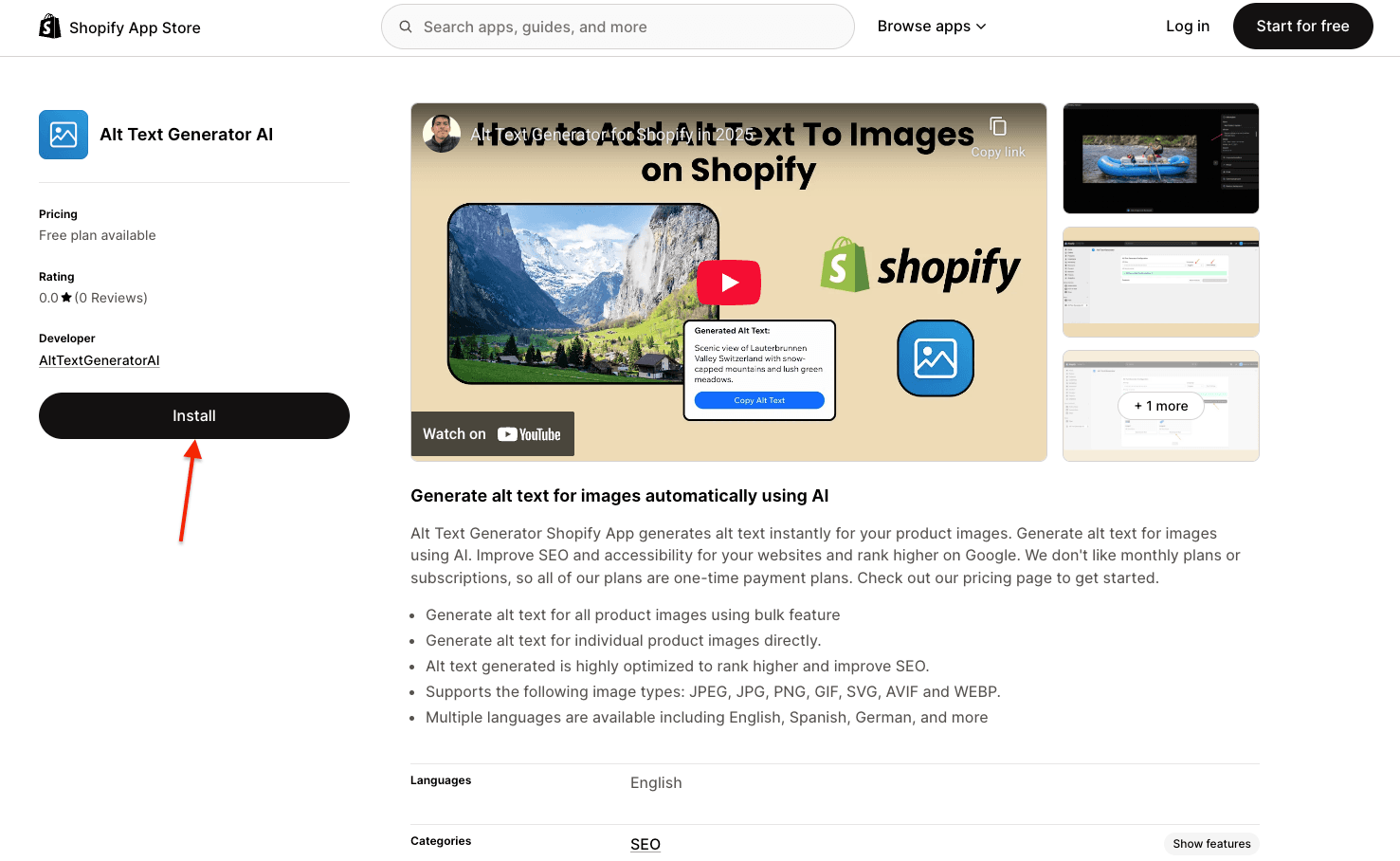
Install the Shopify App
- Go to the Shopify App Store
- Search for "Alt Text Generator AI"
- Click on Alt Text Generator AI
- Click Install
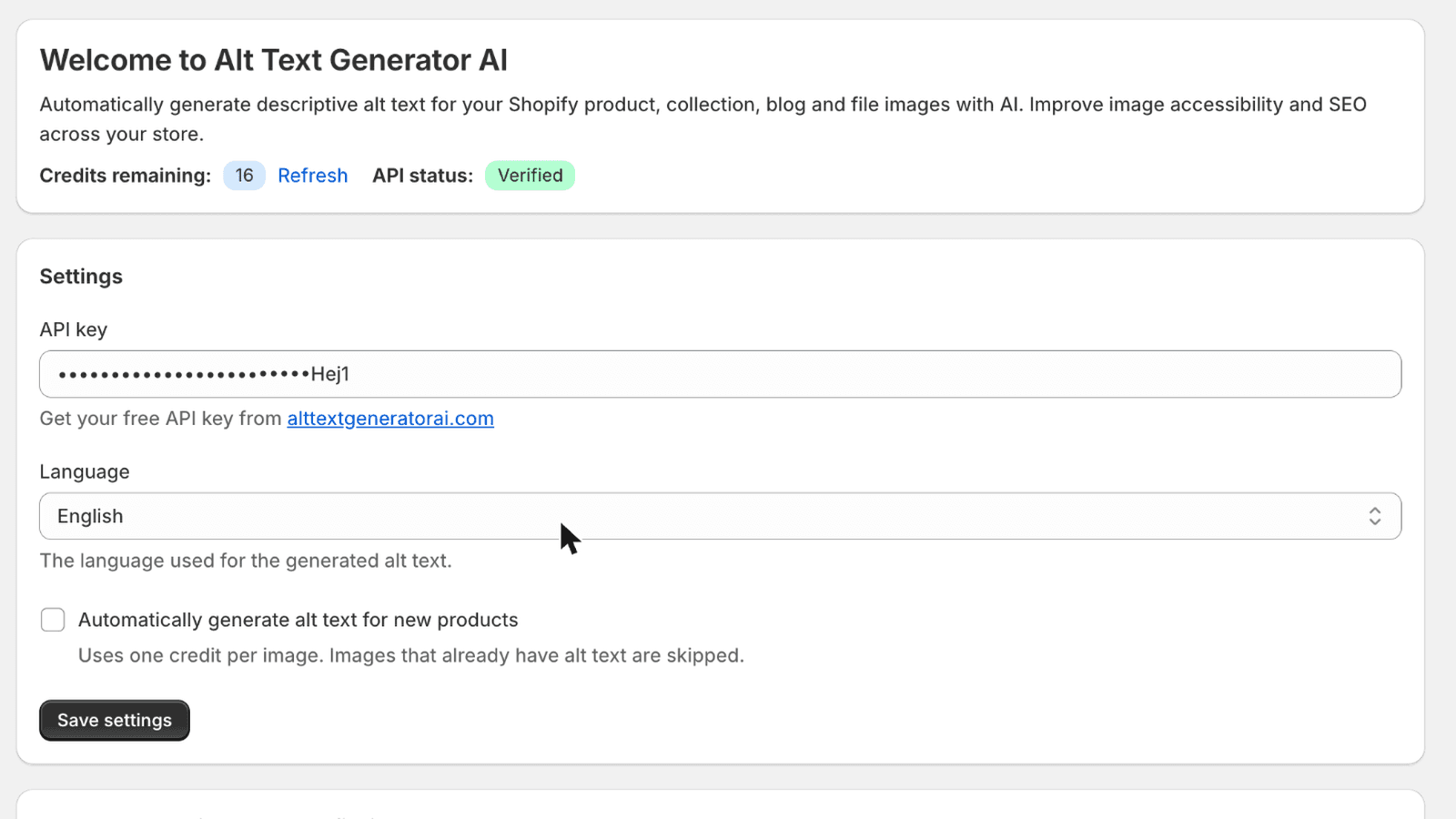
Configure Your API Key and Settings
- Create an account on AltTextGeneratorAI.com
- Go to your dashboard and copy your API key
- Return to your Shopify admin and open the Alt Text Generator AI app
- Paste your API key into the API key field
- Choose your Language from the list of 131+ languages
- Optional: check Automatically generate alt text for new products
- Click Save settings
⚠️Your API key is unique to your account. Keep it secure.
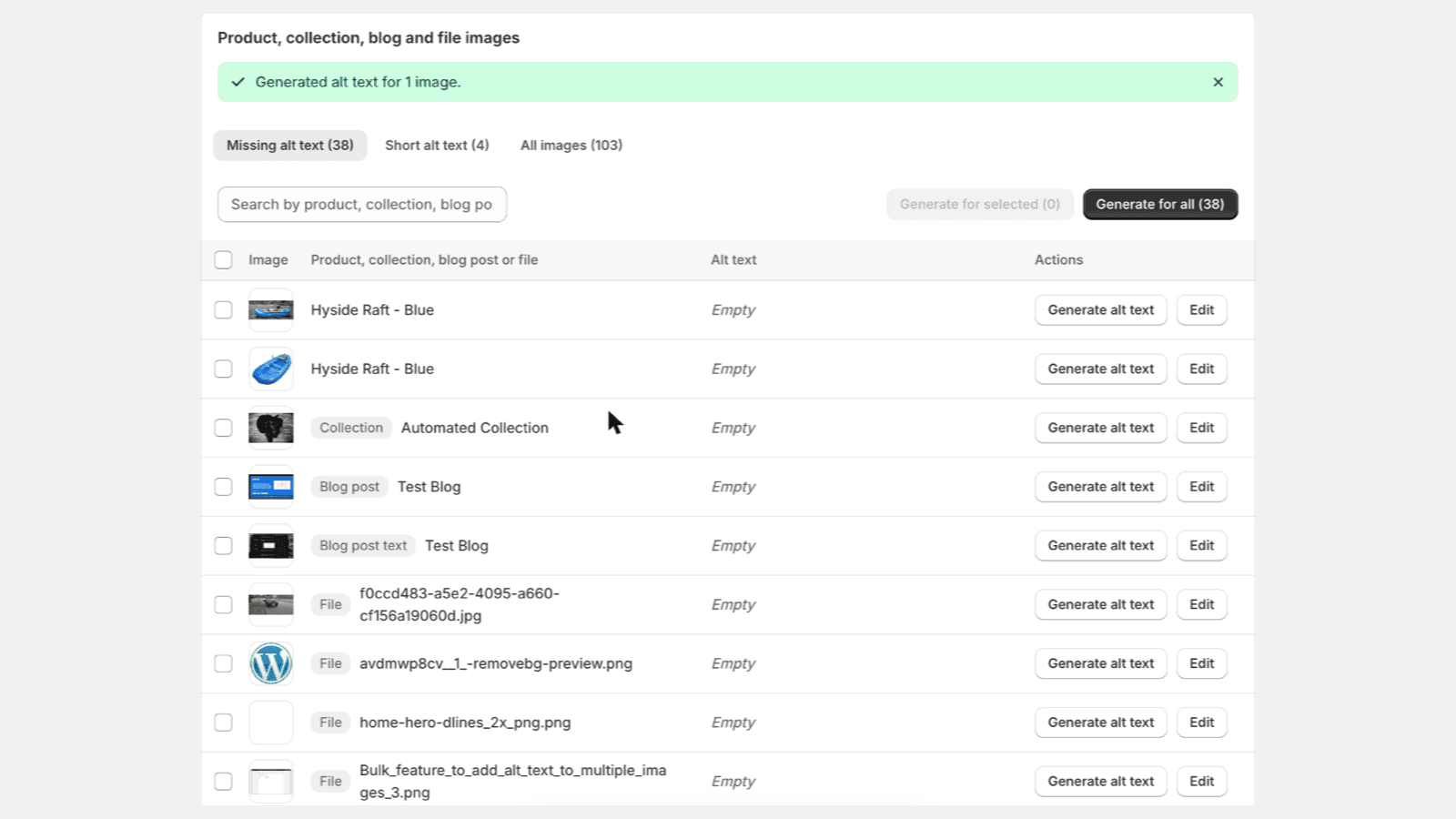
Find Images That Need Alt Text
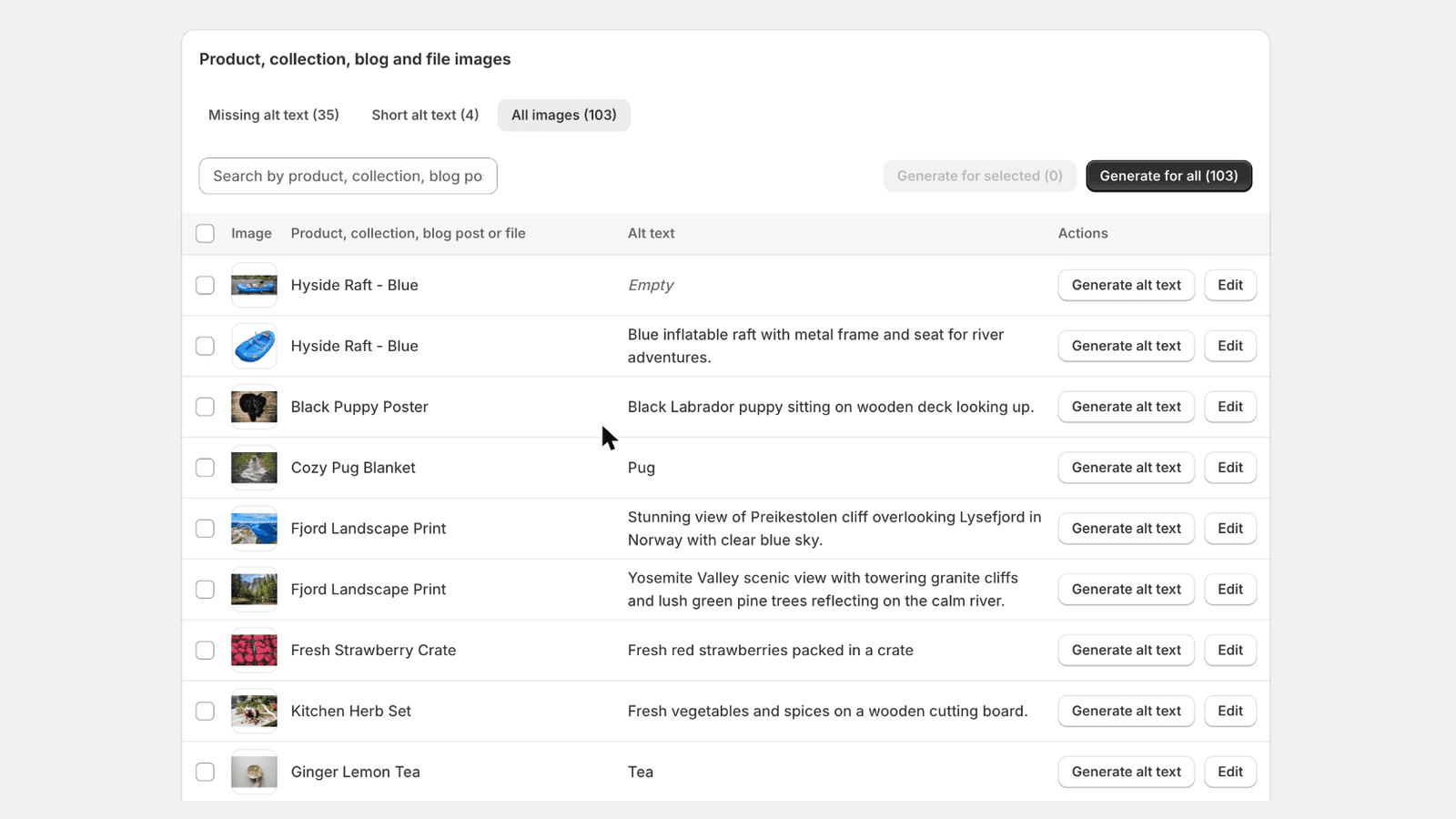
- Scroll to Product, collection, blog and file images
- Missing alt text lists images with no alt text
- Short alt text lists images with alt text under 20 characters
- All images lists every product, collection, blog post and file image
- The number next to each tab shows how many images are in it
- Use the search box to find a product, a collection, a blog post, a file or existing alt text
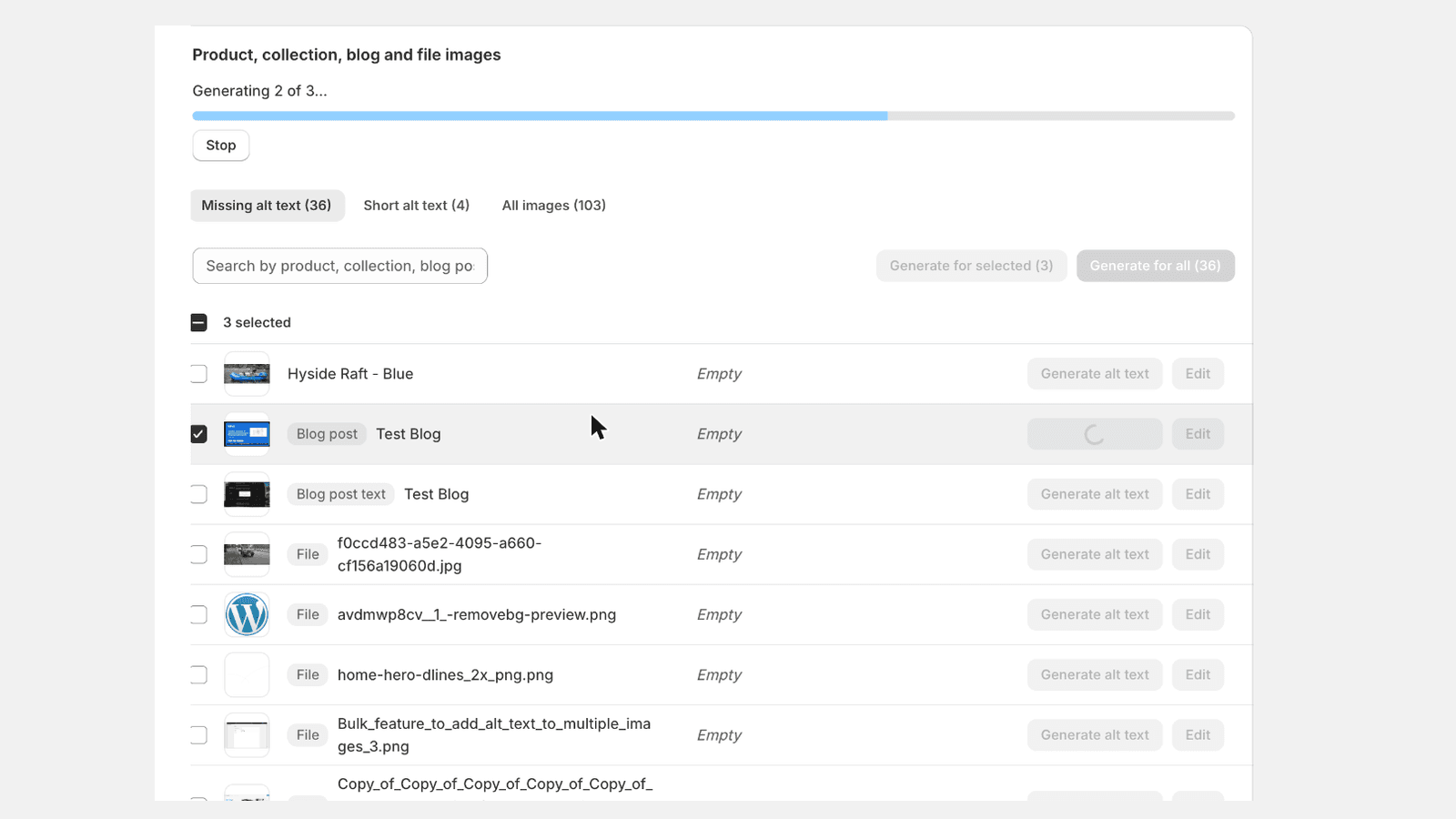
Generate Alt Text
- Click Generate alt text on a single row
- Or check several rows and click Generate for selected
- Or click Generate for all and confirm to process every image in the tab
- A progress bar shows how many images are done. Click Stop to cancel at any time
- Done! A message tells you how many images now have alt text
Review and Edit Alt Text
- Open the All images tab to see the alt text next to every image
- Click Edit to change alternative text, then click Save
- Click Generate alt text on any row to write it again
- Check your remaining Credits at the top of the app
Collection, Blog and File Images
- Collection, blog post and file images appear in the same list, with a gray Collection, Blog post, Blog post text or File badge
- Blog post is the featured image. Blog post text is an image placed inside the post text or excerpt. File is an image from Content > Files, such as a banner or an icon
- Click Generate alt text on the row, or check several rows and click Generate for selected
- To check a collection, open Products > Collections, open the collection and click its image
- To check a blog post, open Content > Blog posts, open the post and click its featured image, or click an image in the post text
- The generated text is in the Alt text field
Generate From the Products Page
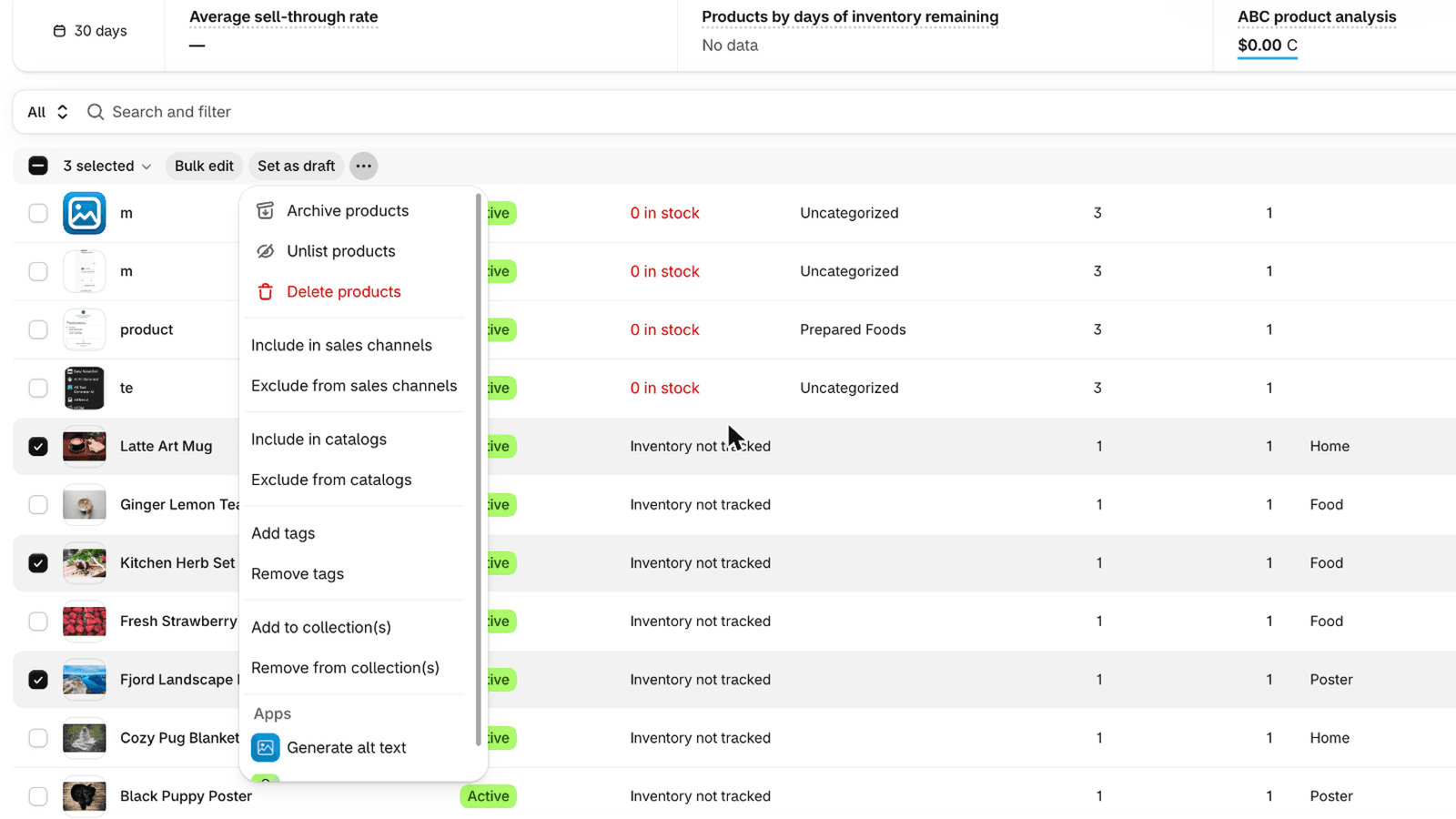
- Go to Products in your Shopify admin
- Check the products you want
- Click the ... menu above the list
- Under Apps, click Generate alt text
- Click Generate alt text in the window that opens
Automate With Shopify Flow
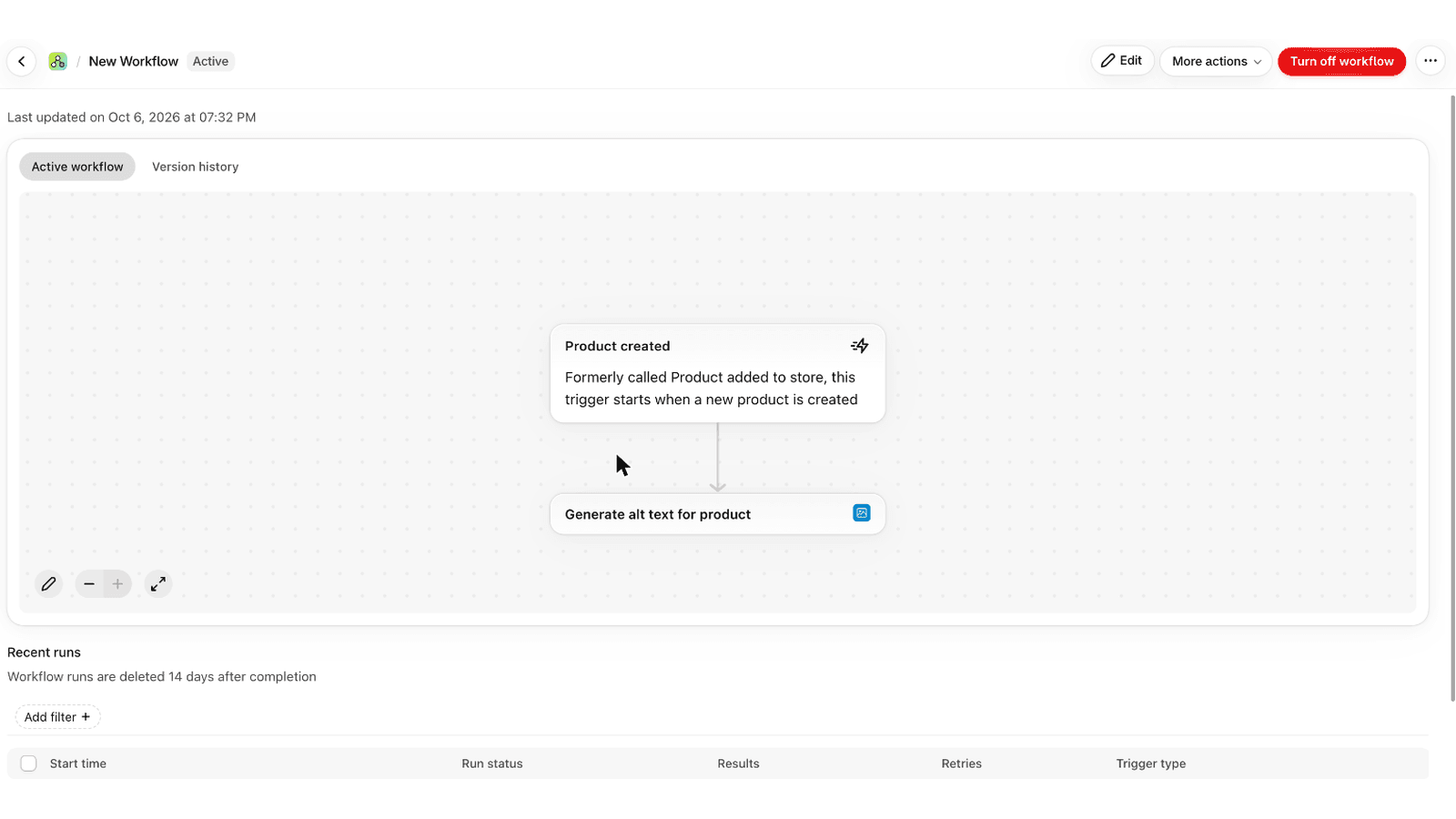
- Open the Flow app in Shopify and click Create workflow
- Choose a trigger, for example Product created
- Add the action Generate alt text for product
- Select the product from the trigger, for example product.id
- Turn on the workflow
See the Result in Shopify
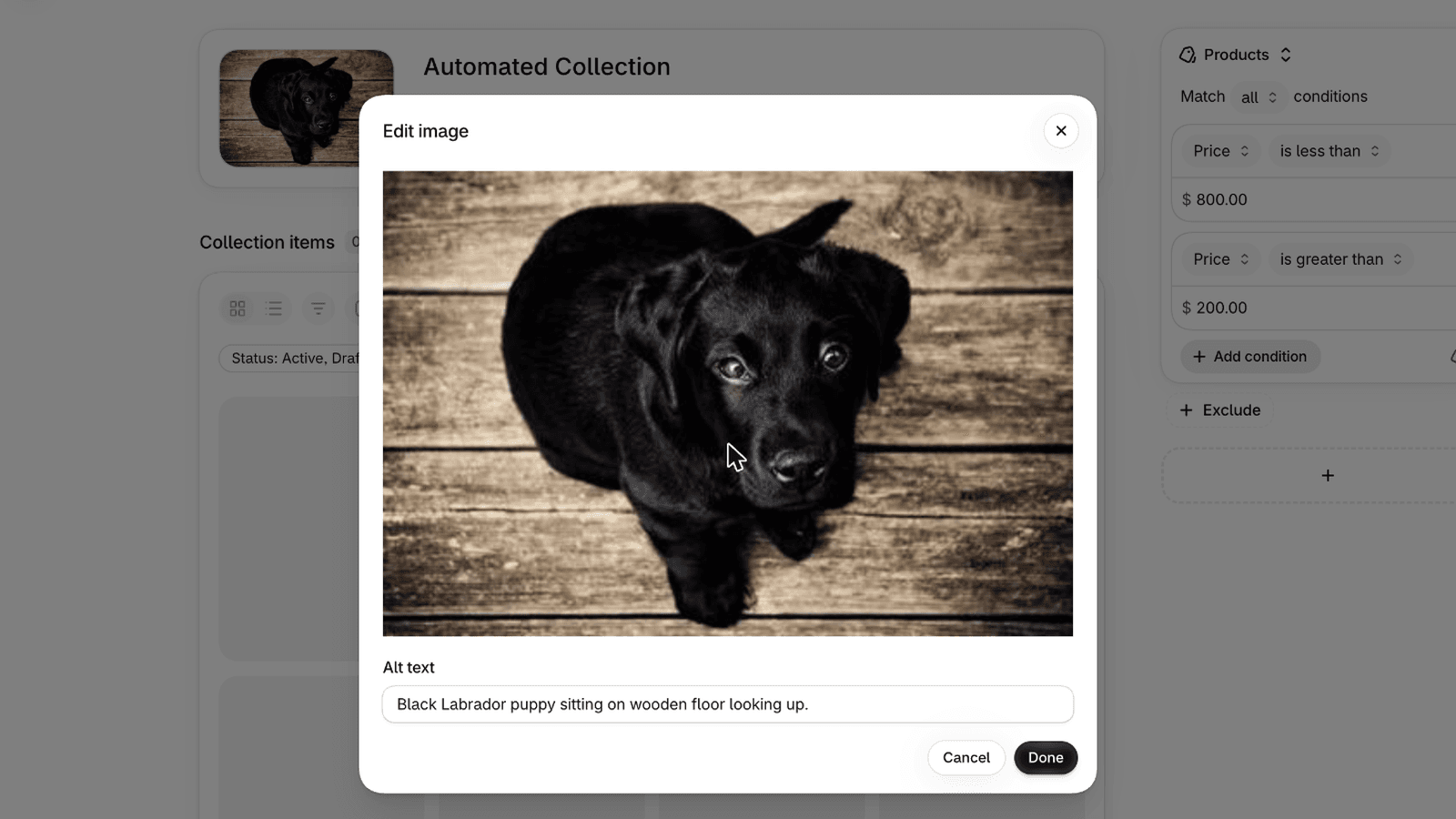
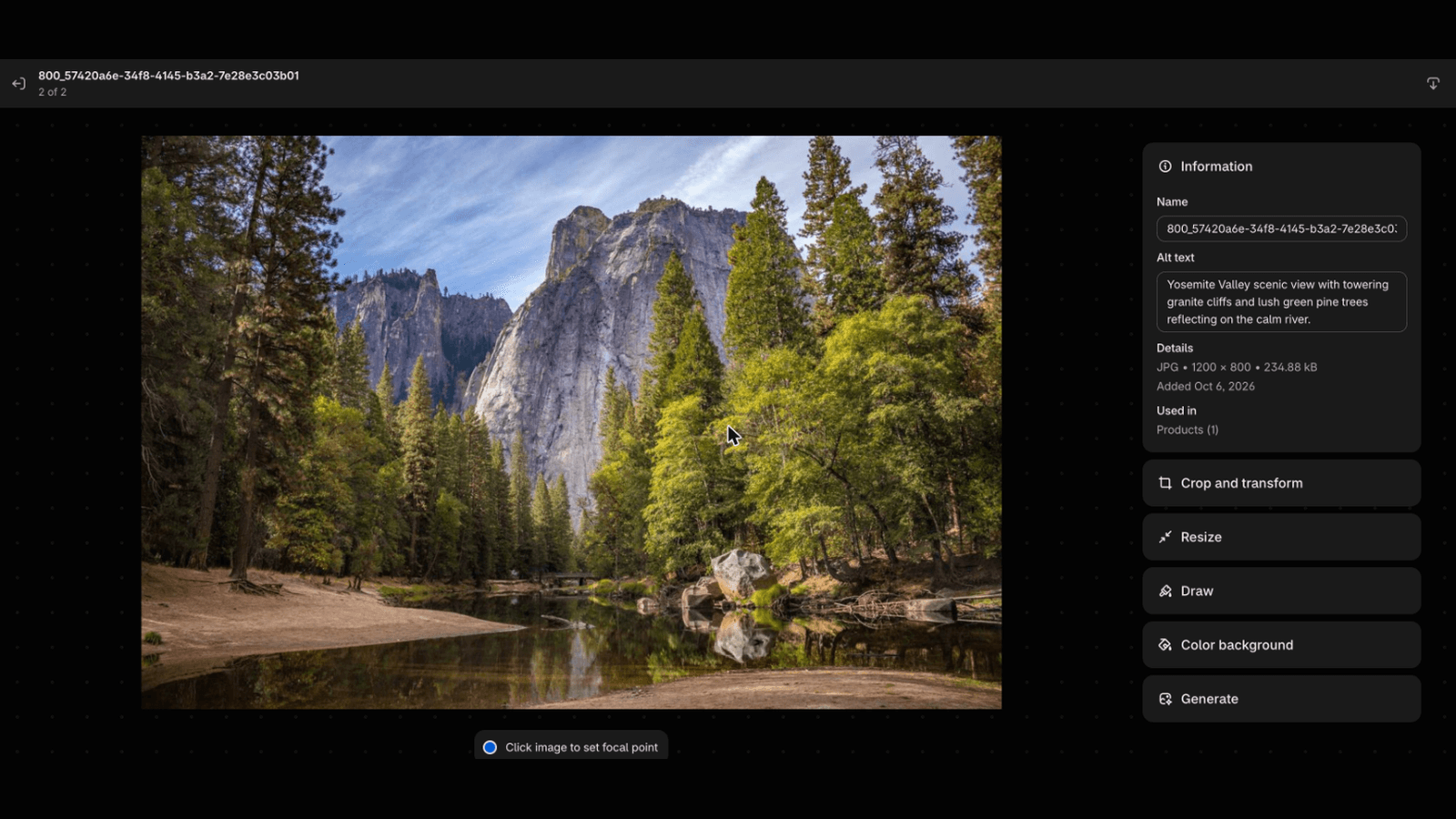
- Open any product in Shopify admin
- Click one of its images
- The generated description is in the Alt text field
- You can edit it here at any time
App Features
Automatic
Turn on automatic generation and every new product and collection image gets alt text as soon as you add it. Blog images and files are listed in the app and generated in bulk. No extra steps needed.
Bulk Generate
Generate alt text in bulk for all products, collections, blog images and files. Scan your store, fix every missing or short alt text in a few clicks, or generate for the whole list at once.
Collection, Blog and File Images
Collection images, blog featured images, images inside blog post text and files from Content > Files (banners, icons and more) are included. Find the ones missing alt text and generate them in bulk.
Products Page Action
Select products in Shopify admin and click Generate alt text from the Products page menu.
Shopify Flow
Add Generate alt text for product to any Flow workflow to automate alt text with your own rules.
Review and Edit
Edit any generated alt text in the app, or generate it again for a single image.
Extensive Language Support
Supports 131+ languages including English, Spanish, French, German, Italian, Portuguese, Chinese, Japanese, Arabic and many more.
Extensive Image Support
Supports JPEG, JPG, PNG, GIF, SVG, AVIF, and WEBP image formats.
SEO Optimized
Alt text is written to help your products rank in Google Image Search and improve your store's SEO.
Accessibility Compliant
Helps your store meet WCAG and ADA accessibility standards and makes it usable for screen reader users.
One-Time Payment
No monthly subscriptions. Credits are bought once, never expire and work on every Alt Text Generator AI integration.
Free Credits
Get 2 free credits when you sign up to test the app with your Shopify products.
Why Use Alt Text Generator for Shopify?
❌ Without the App
- •Manually write alt text for every product, collection, blog and file image
- •100 products × 5 images = 500 descriptions to write
- •New products often published without alt text
- •Poor SEO and accessibility for your store
✅ With Alt Text Generator
- •Generate alt text in bulk for all products, collections, blog images and files
- •500 images processed in minutes, not hours
- •New products and collections get alt text automatically
- •Improve Google rankings and meet WCAG and ADA accessibility standards
Shopify App FAQs
What is the Alt Text Generator AI Shopify App?
It's a Shopify app that generates alt text for your product, collection, blog and file images using AI. Improve SEO and accessibility for your store and rank higher on Google.
How do I install the app?
Go to the Shopify App Store, search for "Alt Text Generator AI", and click Install. Then paste your API key from your dashboard into the app's settings.
How does the bulk feature work?
Open the app and pick a tab: Missing alt text, Short alt text or All images. Check the images you want and click Generate for selected, or click Generate for all to process the whole tab. Alt text is saved to your Shopify images automatically.
Can alt text be generated automatically for new products?
Yes. Check Automatically generate alt text for new products in the app settings. New product images, and images you add to a product later, get alt text on their own.
Does it work with collection, blog and file images?
Yes. Collection images, the featured image of each blog post, images placed inside blog post text and files from Content > Files are listed in the app, and you can generate and edit their alt text like any product image.
Does it work with Shopify Flow?
Yes. Add the action Generate alt text for product to a Shopify Flow workflow, for example after the Product created trigger, and alt text is generated for that product's images.
Can I generate alt text from the Products page?
Yes. Check products in Shopify admin, open the ... menu, and under Apps click Generate alt text. Done!
Can I edit the generated alt text?
Yes. Click Edit next to any image in the app, change the text and save it. You can also edit it in Shopify admin like any other alt text.
Do I get free credits?
Yes! You get 2 free credits when you sign up.
What image formats are supported?
The app supports JPEG, JPG, PNG, GIF, SVG, AVIF, and WEBP image formats.
What languages are available?
131+ languages, including English, Spanish, French, German, Italian, Portuguese, Dutch, Russian, Chinese, Japanese, Korean, Arabic, Hindi, Turkish and many more. Choose your language in the app settings.
Can I use one API key on more than one store?
Yes. The same API key works on several stores, and they share the same credits.
Are there monthly subscription fees?
No! We don't like monthly plans or subscriptions, so all of our plans are one-time payments and affordable to all users. See pricing.
Is the generated alt text good for SEO?
Yes! Alt text is written to help search engines understand your product images, which improves your store's SEO and visibility in search results.
Does alt text help with accessibility?
Absolutely. Alt text allows screen readers to describe product images to visually impaired customers, helping your store meet WCAG and ADA accessibility standards.
Other Integrations

Ready to Get Started?
Install the Shopify app and start generating alt text for your product images. Get 2 free credits on sign up!