Alt Text Generator Storyblok App
Generate SEO-optimized alt text for the images in your Storyblok space, in bulk and in 131 languages

Alt Text Generator AI writes SEO-friendly alt text for your images with AI. The Storyblok app adds a page to your space that lists your images with a preview, finds the ones with no alt text and writes it for one image, a selection or all of them. You review the text, change anything you like and save it to the asset. This step-by-step guide shows how to install and use it.
Better alt text helps your site's accessibility and image SEO, and saves hours of writing descriptions by hand. It runs inside Storyblok, so there is no code to add to your project.
Install the App
- Click Install the Storyblok App above, or open the install link here. The source is on GitHub
- Choose the space to install it in and approve the permissions
- Open Apps in the sidebar and click Alt Text Generator AI
💡The app needs permission to read and update the assets of your space. You can uninstall it at any time.
Add Your API Key
- Get your API key from the dashboard
- Paste the key into API key and click Save key
- Your credits show at the top of the page, and you can pick the language of the alt text from English to Zulu
💡Only space admins can change the key. It is stored encrypted and is never sent back to the browser.

Generate and Save Alt Text
- Missing lists the images that have no alt text. All shows everything, and you can search by file name
- Tick the images you want, or use Select all, then click Generate selected or Generate all missing. Each image uses 1 credit. You can also click Generate on a single image
- Read the results and edit any text you want to change
- Click Save changes to save them to your assets all at once
💡Generate all missing skips images that already have alt text. Tick an image to generate it anyway.
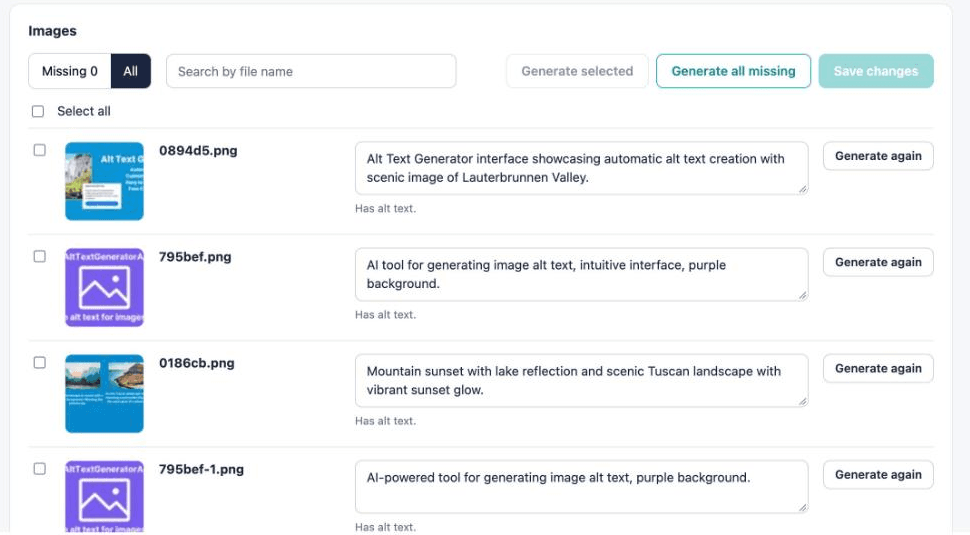
Bulk Page in Your Space
A page in your Storyblok space shows your images with a preview and lists the ones missing alt text. Tick the ones you want and save them all at once.
Saved to Your Assets
The text is saved as the alt text of each asset, so it shows in your asset library. Nothing else to set up.
131 Languages
Choose the language of the alt text, and write it for your international audience.
Your Key Is Stored Encrypted
The API key is kept encrypted, only space admins can change it, and the browser never gets it back.
No Code Needed
It runs inside Storyblok. There is nothing to add to your project or your deployment.
Free Credits
Sign up to get free credits and test alt text generation on your own images.
Activate Your App
Install the app, then add your API key on the Alt Text Generator AI page.